Windows PC
Download the ZIP build
- Review the PC buildCheck version, language, and requirements.
- Choose Drive or MEGAThe host is visible before the external page opens.
- Extract and runUnzip into a separate folder; no Android emulator is needed.
Download the latest Plants vs Zombies Fusion build for Windows PC or Android APK. Check the current version, English translation status, and original release source before choosing a download.
Latest version PVZ Fusion 4.0.5 View downloads →
The video shows the community route. This guide organizes the same release choices by platform, version, and language.
Current build
The latest base game is released in Chinese for PC and Android. Community English builds can support a different version, so this table separates release, platform, language, and source before you choose a file.

| Current release | PVZ Fusion 4.0.5 · October 1, 2026 |
|---|---|
| Platforms | Windows PC and Android |
| File type | Windows ZIP · Android APK |
| Base language | Chinese release |
| English | Community translation support varies by platform and version. Check compatibility. |
| Release source | PVZ Fusion Fans Discord release listing |
| External hosts | Google Drive or MEGA, named before every click |
| Before updating | Back up your save data, then review the 4.0.5 release notes. |
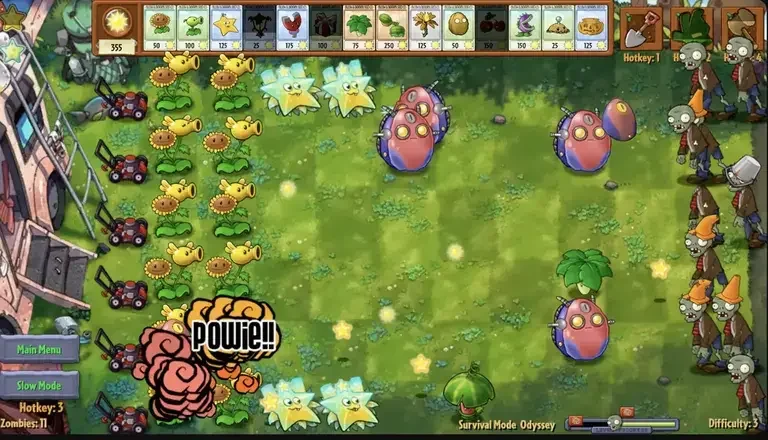
The game
PVZ Fusion is a standalone fan-made game inspired by Plants vs. Zombies. It is often called a mod in searches, but it runs as its own Unity game on Windows and Android rather than modifying an existing PvZ installation.
Its central mechanic lets compatible plants combine into new defenders with different attacks, defenses, and upgrade paths. Whether a player searches for PVZ Fusion, Plants vs Zombies Fusion, or the PVZ Fusion mod, the game is the same standalone fan project built around recipes, stronger enemies, bosses, and challenge modes.
From page to game
First choose PC or Android, then check whether you want the newest Chinese release or a compatible English translation. The platform page shows the current Google Drive and MEGA destinations; Windows users extract the ZIP, while Android users install the APK.
Windows PC
Android
Current release
Version 4.0.5 expands Gods Evolved with Inferno difficulty and Curse Trial traits. It also adds new standard and Ultimate fusions, new zombie threats and bosses, and a Snow Land rework; the version page keeps the complete changelog.
Read the full 4.0.5 changelog →Inside the game
Start with familiar plants, combine them into named fusions, then adapt those recipes to different enemies and game modes. The almanac handles the full catalogue.
Plants
Peashooter supplies ranged damage, Sunflower produces sun, and Wall-nut protects the lane. These base roles become ingredients for larger fusion paths.
Browse plants →Fusions
Sunshooter combines Peashooter and Sunflower; Spike-nut combines Spikeweed and Wall-nut.
Browse fusion recipes →Zombies
Buckethead, Pole Vaulting, Pogo, and special fusion zombies pressure different lanes and punish a defense built around only one damage type.
Browse zombies →Modes
Adventure introduces the system; Odyssey, Survival, challenge maps, and mini-games change which recipes, resources, and positioning are practical.
Browse mechanics →Four starter recipes
 Peashooter
 Sunflower
 Sunshooter
 Spikeweed
 Wall-nut
 Spike-nut
 Cherry Bomb
Wall-nut
Cherry Bomb
Wall-nut
 Cherry-nut
Peashooter
Cherry-nut
Peashooter
 Ice-shroom
 Snow Pea
Four ways to play
Adventure
The main progression introduces fusion systems across multiple levels and areas.
Challenge
Focused objectives test specific mechanics; Fusion Challenges unlock Super recipes.
Survival
Multiple waves force you to rebuild and adapt the defense between rounds.
Odyssey
A longer advanced mode adds exclusive fusions, stronger zombies, rotating maps, and modifiers.
Gameplay proof


Source & safety
No download page can honestly guarantee that every file is “100% safe.” What this guide can provide is a visible trail from the community release listing to the named external host, plus practical checks before you open a ZIP or APK.
Quick answers
Choose the Windows PC or Android APK guide on this page. The platform page shows the current version and language before presenting the Google Drive or MEGA destination listed for that build.
Yes. Use the Android APK page to check the newest base release, available external hosts, language notes, and installation steps. The APK is separate from the Windows ZIP build.
The base release is Chinese. English support comes from community translation projects and may trail the current PC or Android version. Check the English compatibility guide before downloading.
No. It is a standalone fan-made game inspired by Plants vs. Zombies and is not an EA or PopCap release. “Official source” on this guide refers to the recognized fan-community release trail, not an official EA product.
Safety cannot be guaranteed by a badge. Match the platform, version, language, filename, and host against the community release listing, avoid unknown repacks, and scan the downloaded file before opening it.
The PVZ Fusion release covered here is a downloadable game for Windows and Android. Browser games using a similar name may be separate recreations, not the same build.
Extract the full ZIP into its own folder before running the game. Do not launch the executable from inside the compressed archive. The PC guide covers the current build and Windows-specific troubleshooting.
Confirm that the APK finished downloading, that your device allows installation from the browser or file manager you used, and that enough storage is available. Open the Android guide for version and installation checks.
Continue with one task
The homepage gives the overview. These focused pages handle installation, language compatibility, release verification, and game reference without repeating the same article.
Choose the next step
The homepage routes broad intent. Each destination page completes one specific task.