PVZ Fusion APK for Android — Free Download & Install Guide
PvZ Fusion 4.1 is the November 1 Travel Evolution release. It adds new basic, Commando and Ultimate fusions, Pozeidon boss content, Ultimate Zombies, drawing minigames and a new pet. The game is supplied in Chinese; no verified 4.1 English patch was provided.
The game is in Chinese by default. For English and other language patches, see the community translation project.
Download PvZ Fusion 4.1 for Android/Other Platforms
What's New in PvZ Fusion 4.1
- New basic, Commando, Ultimate and Red Card fusions
- New Pozeidon boss, Ultimate Zombies and Kindergarten Cherry-Z pet
- Magic Paint Brush and Can I Draw Better Than You? minigames
- Pozeidon, trident and fusion-balance reworks
Previous APK Versions — Download Archive
Need an older Android package? Use this Plants vs Zombies Fusion APK archive to find stable releases, older translation-compatible builds, and previous update pages.
| Version | Release Date | Highlights | Download |
|---|---|---|---|
| 4.0.5.1 | 2026-10-02 | Previous hotfix with Mini Cactus and Professor Z revival fix | Download |
| 4.0 | 2026-09-19 | Snowfield Night, Demon Plants, Gods: Evolution additions, and new synergies | Download |
| 3.9 | 2026-08-15 | Gods Evolved Inferno, Curse Trials, new fusions and bosses | Download |
| 3.8.1 | 2026-07-18 | Magic Ice Shooter, Black Olive General boss, Survival save fix | Download |
| 3.8 | 2026-07-12 | 2nd Anniversary — Zen Garden rework, new fusions & Snowy Night map | Download |
| 3.7 | 2026-06-07 | Snowfield, Commando, and Elemental Synergy content | Download |
| 3.6.1 | 2026-05-10 | Official Stable Release | Download |
| 3.6 | 2026-04-12 | Travel Mode & Snowfield Update | Download |
| 3.5 | 2026-02-28 | Super Custom Level Editor | Download |
| 3.4.2 | 2026-01-25 | Balance Update | Download |
| 3.4.1 | 2026-01-10 | Travel Update Hotfix | Download |
| 3.4 | 2025-12-20 | Travel Update | Download |
| 3.3.1 | 2025-12-15 | Stable older APK with translation support | Download |
| 3.2.1 | 2025-12-23 | Legacy Android build | Download |
| 3.1.1 | 2025-10-15 | Older mobile release | Download |
| 2.8.2 | 2025-08-14 | Popular pre-3.x APK | Download |
| 2.7 | 2025-07-05 | Evolution update archive | Download |
| 2.6.1 | 2025-06-15 | Stable 2.6 series APK | Download |
| 2.5.1 | 2025-04-27 | Legacy translation-friendly APK | Download |
| 2.1.7 | 2024-04-05 | Classic older Android archive | Download |
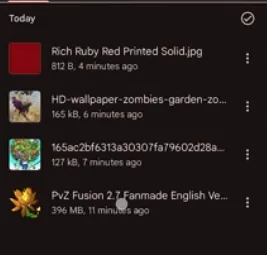
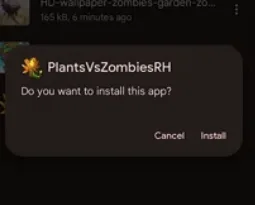
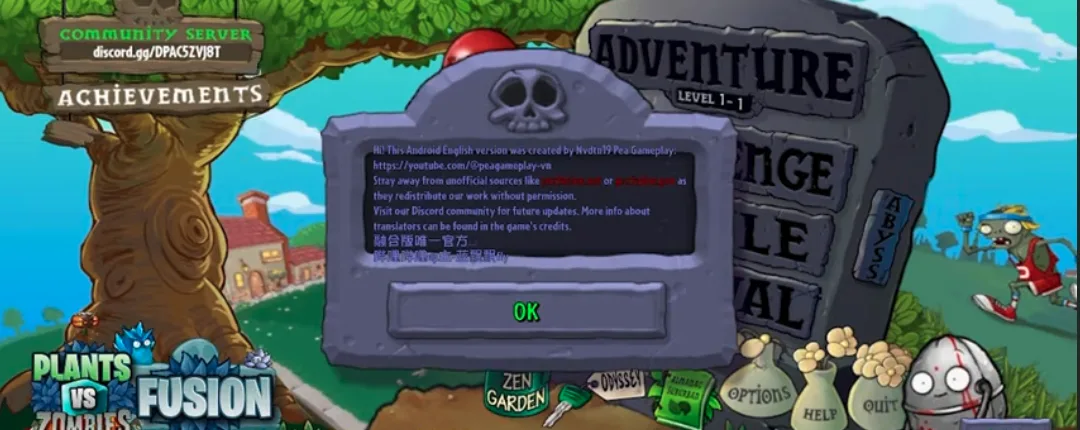
PvZ Fusion APK Screenshots
Preview the PvZ Fusion APK on Android, including mobile gameplay and fusion plant action.
What is Plants vs Zombies Fusion APK?
Plants vs Zombies Fusion APK is the Android package for the fan-made PvZ Fusion mod. Instead of only placing normal plants from the original game, players combine plants to create hybrid units with new attacks, defensive roles, and special effects.
The APK version is useful for mobile players who want quick offline access without a Windows PC. It includes the same core fusion gameplay, newer zombie types, expanded challenge modes, and regular version updates from the PvZ Fusion community.
Because PvZ Fusion is not distributed through Google Play, Android players need to install the APK manually. Download from trusted mirrors, keep enough free storage, and avoid repackaged APK sites that add ads or unwanted files.
Plants, Zombies, and Fusion Content in the APK
Hybrid Plants
The core of PvZ Fusion is combining plants into stronger hybrid units. Offensive fusions add new projectile types, defensive fusions improve lane control, and support fusions change sun generation or utility effects.
Expanded Zombie Waves
Later versions add stronger zombies, armored threats, flying enemies, and boss-style encounters. These enemies push players to mix damage types instead of relying on one plant layout.
Fusion Recipes
Fusion recipes reward experimentation. Some combinations are simple upgrades, while advanced and ultimate fusions require specific plant paths or version-specific content.
Game Modes
Adventure, Survival, Travel Mode, Mini-Games, and custom levels give the APK more replay value than a normal one-path mobile mod.
PVZ Fusion APK vs PC Version
Choose the APK if you want to play on an Android phone or tablet. Choose the PC version if you want better controls, easier save backups, and a larger screen.
| Feature | APK | PC |
|---|---|---|
| Best for | Android phones and tablets | Windows laptops and desktops |
| Install method | Manual APK install | Extract ZIP and run launcher |
| Controls | Touchscreen | Mouse and keyboard |
| Updates | Install new APK over the old one | Extract new folder and back up saves |
| Recommendation | Best for mobile play | Best for long sessions |
How to Install PvZ Fusion APK on Android
Step 1: Enable Unknown Sources
- Open your Android Settings → Security (or Privacy)
- Enable 'Install from Unknown Sources' or 'Allow installation of apps from unknown sources'
- On Android 8+, you may need to grant this permission per-app — enable it for your file manager or browser
Step 2: Download the APK
- Tap a Google Drive, CN Wiki Quark, or MEGA community-mirror button above
- Check the mirror listing for the current file size and wait for the download to finish
- Do NOT open the file until the download is 100% complete — partial installs will fail
Step 3: Install & Launch
- Open your Downloads folder and tap the PvZ Fusion APK file
- Tap 'Install' when prompted by Android
- Once installed, open PvZ Fusion from your app drawer
- The game works fully offline — no internet needed after installation
Is PvZ Fusion APK Safe to Download?
The 4.1 announcement lists Google Drive, MEGA, and a CN Wiki Quark source for Android/other platforms. Compare the file details, scan the package before opening it, and avoid unfamiliar sites that may repackage it. A Google Play Protect warning means the app is being sideloaded; verify the source before deciding whether to continue.
How to Play PvZ Fusion APK in English
PvZ Fusion is in Simplified Chinese by default. The Blooms community maintains a free multi-language translation project on GitHub that covers PvZ Fusion 3.6.1. The English patch for Android may update slightly slower than the PC version — check the GitHub releases or Discord for the latest Android-compatible English APK.
- Download the latest Android English APK from the Blooms GitHub page (PVZF-Translation releases)
- Install the English APK over your existing PvZ Fusion installation — your save data is preserved
- Launch the game and go to Settings → Language → English
- If text remains in Chinese, verify you have the release matching version 3.6.1
Android System Requirements
| Minimum | Recommended | |
|---|---|---|
| OS | Android 5.1 | Android 10 or higher |
| RAM | 2 GB | 4 GB |
| Storage | 500 MB free space | 1 GB free space |
| Notes | No root required | For best performance |
Android Troubleshooting
APK Won't Install (Parse Error)
This usually means the download was incomplete or corrupted. Delete the package and download it again, waiting for the transfer to finish before opening it. Also make sure you have enough free storage space.
Google Play Protect Blocks Installation
Google Play Protect may warn about APKs installed outside the Play Store. Confirm that you used a listed download link, compare the file details, and scan the APK before deciding whether to continue. Do not bypass a warning for a file from an unfamiliar source.
'App Not Installed' Error
This can happen if you have a different version already installed with a different signature. Uninstall the old version first (back up your saves at Android/data), then install the new APK. Also check that you have enough storage space.
Game Crashes or Black Screen on Launch
Close all background apps to free up RAM. Make sure your device meets the minimum requirements (Android 5.1+, 2 GB RAM). Try restarting your device. If the issue persists, re-download and reinstall the APK.
Save Data Lost After Update
Save data is stored at Android/data on your device. Before updating, copy this folder as a backup. If you already lost saves, check if your file manager has a trash/recycle feature. Future updates: always install over the existing version without uninstalling first.
PVZ Fusion APK Game Modes
Endless Survival
Test your defense against infinite zombie waves — how long can your fusion plants hold?
Time Challenge
Complete objectives within strict time limits for bonus rewards.
Travel Mode
Choose your leader route and difficulty in the revamped Travel Mode with Snowfield maps.
Mini-Games & Custom Levels
Play 4 new mini-games or create your own levels with Super Custom event scripting.
How to Play PvZ Fusion APK on PC Using an Emulator
Want to play the Android version of PvZ Fusion on a bigger screen? You can run the APK on your Windows or Mac computer using an Android emulator.
- Download and install an Android emulator: BlueStacks, LDPlayer, or NoxPlayer
- Download the PvZ Fusion APK from the download links above
- Open the emulator and drag the APK file into the emulator window to install it
- Launch PvZ Fusion from the emulator's app drawer and enjoy on your PC
Android Device Compatibility
PvZ Fusion APK has been tested on a wide range of Android devices. Here's what to expect based on your device specifications.
| Tier | RAM | Example Devices | Performance |
|---|---|---|---|
| Best Experience | 6+ GB RAM | Samsung Galaxy S21+, OnePlus 9, Xiaomi 12, Google Pixel 6 | Smooth gameplay at max settings, no frame drops |
| Good Performance | 4 GB RAM | Samsung Galaxy A52, Redmi Note 11, Realme 8 | Smooth gameplay, occasional slowdown in large zombie waves |
| Playable | 2-3 GB RAM | Samsung Galaxy A12, Redmi 9, older mid-range phones | Works but may lag during intense levels. Close other apps first |
| Not Recommended | < 2 GB RAM | Budget phones from 2018 or earlier | May crash or freeze. Upgrade recommended |
PVZ Fusion APK — Frequently Asked Questions
Is PVZ Fusion APK safe to download?
Use the clearly labeled Google Drive, CN Wiki Quark, or MEGA community mirrors on this page, compare the file details, and scan the package before installing it. Avoid unfamiliar third-party mirrors that may repackage the file. Treat a Google Play Protect warning as a reminder to verify the source rather than automatically bypassing it.
Can I play PVZ Fusion APK offline?
Yes, PVZ Fusion APK works fully offline after installation. All game modes — Adventure, Survival, Travel Mode, Mini-Games — play without internet. You only need a connection to download the APK and check for updates.
How do I play PVZ Fusion APK in English?
PvZ Fusion is in Chinese by default. Download the English translation patch from the Blooms community GitHub page (PVZF-Translation). Install the English APK over your existing installation. Visit our English Translation Guide for detailed instructions.
What Android version is required for PVZ Fusion?
PVZ Fusion APK requires Android 5.1 or higher. We recommend at least 2 GB RAM and 500 MB free storage. The game runs on Unity and works on most modern Android devices including tablets. No root access is required.
How do I update PVZ Fusion APK without losing saves?
Download the new APK from our download page and install it directly over the existing version — do not uninstall first. Your save data is preserved automatically. For extra safety, back up the Android/data folder before updating.
Why does the APK say 'App Not Installed'?
This happens when you have a different version installed with a different app signature. Uninstall the old version first, then install the new APK. Back up your save data from Android/data before uninstalling. Also make sure you have at least 1 GB of free storage.
Does PVZ Fusion APK work on tablets?
Yes, PVZ Fusion APK works on Android tablets running Android 5.1 or higher. The game adapts to different screen sizes automatically. Larger screens make it easier to place plants during intense zombie waves.
Where are PVZ Fusion save files on Android?
Save files are stored in the Android/data folder on your device. Use a file manager to navigate there. Back up this folder before updating or reinstalling. If you install a new version over the old one (without uninstalling), saves are preserved automatically.
By downloading, you agree to our terms of service and privacy policy.
For the best gaming experience, make sure your device meets the minimum system requirements.
View source code on GitHub