Baixar PVZ Fusion APK para Android
PvZ Fusion 4.0 é o último lançamento chinês do mod Plants vs Zombies Fusion. Os arquivos Android/outras plataformas abaixo são espelhos da comunidade, não a distribuição oficial do desenvolvedor para PC. Google Drive, CN Wiki Quark e espelhos MEGA estão listados; nenhum patch de jogo 4.0 em inglês verificado foi fornecido.
O jogo está em chinês por padrão. Para obter patches em inglês e outros idiomas, consulte o projeto de tradução da comunidade.
Baixe PvZ Fusion 4.0 para Android/outras plataformas
O que há de novo no PvZ Fusion 4.0
- Snowfield Night Parte 1, inserida através do diário e níveis recomendados
- Plantas Demoníacas que não podem morrer, mas impõem efeitos negativos, com mais fusões e uma futura loja de recompensas planejada
- Gods: Evolution agora concede Gods Coins e adiciona uma rota de evolução e uma enciclopédia de características
- Novas plantas básicas, Snowfield, Commando, Ultimate e red-card, incluindo Supreme Magnetar e Ouroboros Pot
- Frozen Tall-nut Trident Zombie, Scratch and Sniff, retrabalhos de sinergia de Fornalha e Magnetar, atualizações de equilíbrio e correções de bugs
Versões anteriores do APK – Baixar arquivo
Precisa de um pacote Android mais antigo? Use este arquivo APK do Plants vs Zombies Fusion para encontrar versões estáveis, versões mais antigas compatíveis com tradução e páginas de atualização anteriores.
| Version | Release Date | Highlights | Download |
|---|---|---|---|
| 3.9 | 2026-08-15 | Gods Evolved Inferno, Curse Trials, novas fusões e chefes | Download |
| 3.8.1 | 2026-07-18 | Magic Ice Shooter, chefe do Black Olive General, correção de salvamento de sobrevivência | Download |
| 3.8 | 2026-07-12 | 2º aniversário – retrabalho do Zen Garden, novas fusões e mapa Snowy Night | Download |
| 3.7 | 2026-06-07 | Conteúdo de Snowfield, Commando e Elemental Synergy | Download |
| 3.6.1 | 2026-05-10 | Lançamento Oficial Estável | Download |
| 3.6 | 2026-04-12 | Modo de viagem e atualização do Snowfield | Download |
| 3.5 | 2026-02-28 | Editor de nível super personalizado | Download |
| 3.4.2 | 2026-01-25 | Atualização de saldo | Download |
| 3.4.1 | 2026-01-10 | Hotfix de atualização de viagens | Download |
| 3.4 | 2025-12-20 | Atualização de viagens | Download |
| 3.3.1 | 2025-12-15 | APK antigo e estável com suporte para tradução | Download |
| 3.2.1 | 2025-12-23 | Versão legada do Android | Download |
| 3.1.1 | 2025-10-15 | Versão móvel mais antiga | Download |
| 2.8.2 | 2025-08-14 | APK pré-3.x popular | Download |
| 2.7 | 2025-07-05 | Arquivo de atualização do Evolution | Download |
| 2.6.1 | 2025-06-15 | APK estável da série 2.6 | Download |
| 2.5.1 | 2025-04-27 | APK legado compatível com tradução | Download |
| 2.1.7 | 2024-04-05 | Arquivo clássico do Android mais antigo | Download |
Capturas de tela do APK PvZ Fusion
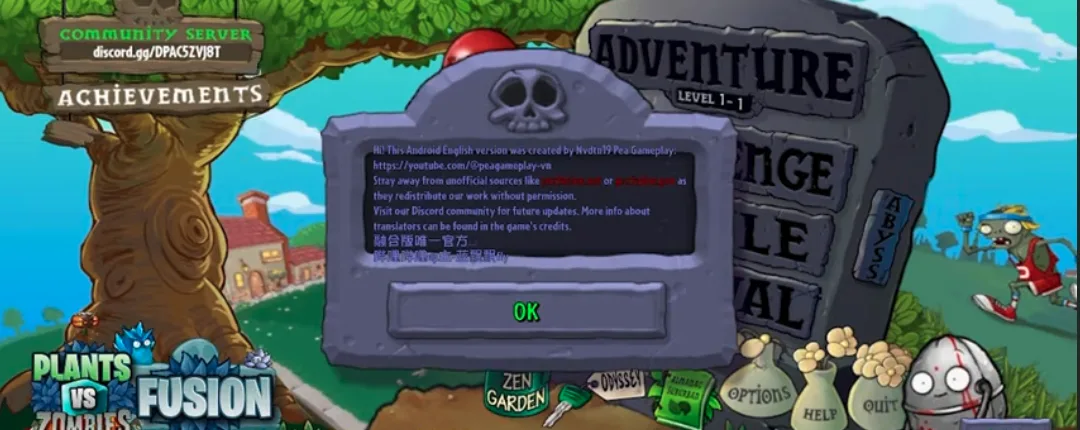
Visualize o APK PvZ Fusion no Android, incluindo jogabilidade móvel e ação da planta de fusão.
O que é o APK de fusão de Plants vs Zombies?
Plants vs Zombies Fusion APK é o pacote Android para o mod PvZ Fusion feito por fãs. Em vez de colocar apenas plantas normais do jogo original, os jogadores combinam plantas para criar unidades híbridas com novos ataques, funções defensivas e efeitos especiais.
A versão APK é útil para jogadores móveis que desejam acesso offline rápido sem um PC com Windows. Inclui a mesma jogabilidade de fusão básica, novos tipos de zumbis, modos de desafio expandidos e atualizações regulares de versão da comunidade PvZ Fusion.
Como o PvZ Fusion não é distribuído pelo Google Play, os jogadores Android precisam instalar o APK manualmente. Baixe de espelhos confiáveis, mantenha armazenamento gratuito suficiente e evite sites APK reempacotados que adicionam anúncios ou arquivos indesejados.
Plantas, zumbis e conteúdo de fusão no APK
Plantas Híbridas
O núcleo do PvZ Fusion é combinar plantas em unidades híbridas mais fortes. As fusões ofensivas adicionam novos tipos de projéteis, as fusões defensivas melhoram o controle da pista e as fusões de suporte alteram a geração do sol ou os efeitos utilitários.
Ondas Zumbis Expandidas
Versões posteriores adicionam zumbis mais fortes, ameaças blindadas, inimigos voadores e encontros estilo chefe. Esses inimigos levam os jogadores a misturar tipos de dano em vez de depender de um layout de planta.
Receitas de fusão
Receitas de fusão recompensam a experimentação. Algumas combinações são atualizações simples, enquanto fusões avançadas e definitivas exigem caminhos de planta específicos ou conteúdo específico de versão.
Modos de jogo
Aventura, sobrevivência, modo de viagem, minijogos e níveis personalizados dão ao APK mais valor de repetição do que um mod móvel normal de caminho único.
PVZ Fusion APK vs versão para PC
Escolha o APK se quiser jogar em um telefone ou tablet Android. Escolha a versão para PC se quiser melhores controles, backups mais fáceis e uma tela maior.
| Recurso | APK | PC |
|---|---|---|
| Melhor para | Telefones e tablets Android | Laptops e desktops Windows |
| Método de instalação | Instalação manual de APK | Extraia o ZIP e execute o inicializador |
| Controles | Tela sensível ao toque | Rato e teclado |
| Atualizações | Instale o novo APK sobre o antigo | Extraia a nova pasta e faça backup dos arquivos salvos |
| Recomendação | Melhor para jogar em dispositivos móveis | Melhor para sessões longas |
Como instalar o APK PvZ Fusion no Android
Etapa 1: habilitar fontes desconhecidas
- Abra as Configurações do Android → Segurança (ou Privacidade)
- Ative ‘Instalar de fontes desconhecidas’ ou ‘Permitir instalação de aplicativos de fontes desconhecidas’
- No Android 8+, pode ser necessário conceder essa permissão por aplicativo – habilite-a para seu gerenciador de arquivos ou navegador
Passo 2: Baixe o APK
- Toque no botão do espelho da comunidade Google Drive, CN Wiki Quark ou MEGA acima
- Verifique a lista de espelhos para o tamanho do arquivo atual e aguarde o download terminar
- NÃO abra o arquivo até que o download esteja 100% concluído – instalações parciais falharão
Etapa 3: instalar e iniciar
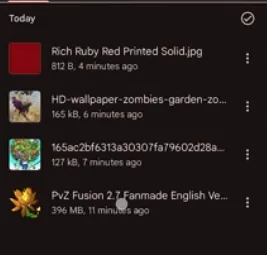
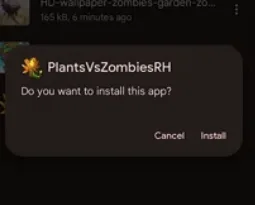
- Abra sua pasta Downloads e toque no arquivo APK PvZ Fusion
- Toque em ‘Instalar’ quando solicitado pelo Android
- Uma vez instalado, abra o PvZ Fusion na sua gaveta de aplicativos
- O jogo funciona totalmente offline – não é necessária internet após a instalação
O download do APK PvZ Fusion é seguro?
Os arquivos 4.0 Android/outras plataformas são espelhos da comunidade provenientes do wiki chinês. Compare os detalhes do arquivo, verifique o pacote antes de abri-lo e evite sites desconhecidos que possam reempacotá-lo. Um aviso do Google Play Protect significa que o aplicativo está sendo transferido; verifique a fonte antes de decidir se deseja continuar.
Como jogar PvZ Fusion APK em inglês
PvZ Fusion está em chinês simplificado por padrão. A comunidade Blooms mantém um projeto de tradução multilíngue gratuito no GitHub que cobre o PvZ Fusion 3.6.1. O patch em inglês para Android pode ser atualizado um pouco mais lentamente do que a versão para PC – verifique as versões do GitHub ou Discord para obter o APK em inglês compatível com Android mais recente.
- Baixe o APK Android em inglês mais recente na página Blooms GitHub (lançamentos PVZF-Translation)
- Instale o APK em inglês sobre sua instalação existente do PvZ Fusion – seus dados salvos são preservados
- Inicie o jogo e vá para Configurações → Idioma → Inglês
- Se o texto permanecer em chinês, verifique se você possui a versão correspondente à versão 3.6.1
Requisitos do sistema Android
| Mínimo | Recomendado | |
|---|---|---|
| SO | Android 5.1 | Android 10 ou superior |
| memória RAM | 2GB | 4GB |
| Armazenamento | 500 MB de espaço livre | 1 GB de espaço livre |
| Notas | Não é necessária raiz | Para melhor desempenho |
Solução de problemas do Android
O APK não é instalado (erro de análise)
Isso geralmente significa que o download foi incompleto ou corrompido. Exclua o pacote e baixe-o novamente, aguardando a conclusão da transferência antes de abri-lo. Certifique-se também de ter espaço de armazenamento livre suficiente.
Instalação do Google Play Protect Blocks
O Google Play Protect pode alertar sobre APKs instalados fora da Play Store. Confirme se você usou um link de download listado, compare os detalhes do arquivo e verifique o APK antes de decidir se deseja continuar. Não ignore um aviso para um arquivo de uma fonte desconhecida.
Erro 'Aplicativo não instalado'
Isso pode acontecer se você já tiver uma versão diferente instalada com uma assinatura diferente. Desinstale a versão antiga primeiro (faça backup dos seus dados salvos em Android/dados) e depois instale o novo APK. Verifique também se você tem espaço de armazenamento suficiente.
Falhas no jogo ou tela preta na inicialização
Feche todos os aplicativos em segundo plano para liberar RAM. Certifique-se de que seu dispositivo atenda aos requisitos mínimos (Android 5.1+, 2 GB de RAM). Tente reiniciar seu dispositivo. Se o problema persistir, baixe novamente e reinstale o APK.
Salvar dados perdidos após atualização
Os dados salvos são armazenados no Android/dados do seu dispositivo. Antes de atualizar, copie esta pasta como backup. Se você já perdeu os salvamentos, verifique se o seu gerenciador de arquivos possui um recurso de lixeira/reciclagem. Atualizações futuras: sempre instale sobre a versão existente sem desinstalar primeiro.
Modos de jogo PVZ Fusion APK
Sobrevivência sem fim
Teste sua defesa contra ondas infinitas de zumbis – quanto tempo suas plantas de fusão aguentam?
Desafio do Tempo
Conclua objetivos dentro de prazos estritos para obter recompensas bônus.
Modo de viagem
Escolha a rota e a dificuldade do seu líder no modo de viagem renovado com mapas de Snowfield.
Minijogos e níveis personalizados
Jogue 4 novos minijogos ou crie seus próprios níveis com scripts de eventos Super Customizados.
Como jogar PvZ Fusion APK no PC usando um emulador
Quer jogar a versão Android do PvZ Fusion em uma tela maior? Você pode executar o APK em seu computador Windows ou Mac usando um emulador Android.
- Baixe e instale um emulador Android: BlueStacks, LDPlayer ou NoxPlayer
- Baixe o APK PvZ Fusion nos links de download acima
- Abra o emulador e arraste o arquivo APK para a janela do emulador para instalá-lo
- Inicie o PvZ Fusion na gaveta de aplicativos do emulador e divirta-se no seu PC
Compatibilidade com dispositivos Android
PvZ Fusion APK foi testado em uma ampla variedade de dispositivos Android. Aqui está o que esperar com base nas especificações do seu dispositivo.
| Nível | RAM | Dispositivos de exemplo | Desempenho |
|---|---|---|---|
| Melhor experiência | Mais de 6 GB de RAM | Samsung Galaxy S21+, OnePlus 9, Xiaomi 12, Google Pixel 6 | Jogabilidade suave nas configurações máximas, sem quedas de quadros |
| Bom desempenho | 4 GB de RAM | Samsung Galaxy A52, Redmi Nota 11, Realme 8 | Jogabilidade suave, lentidão ocasional em grandes ondas de zumbis |
| Jogável | 2-3 GB de RAM | Samsung Galaxy A12, Redmi 9, telefones intermediários mais antigos | Funciona, mas pode atrasar durante níveis intensos. Feche outros aplicativos primeiro |
| Não recomendado | <2 GB de RAM | Telefones econômicos de 2018 ou anteriores | Pode travar ou congelar. Atualização recomendada |
PVZ Fusion APK – Perguntas frequentes
O download do APK PVZ Fusion é seguro?
Use os espelhos da comunidade Google Drive, CN Wiki Quark ou MEGA claramente identificados nesta página, compare os detalhes do arquivo e verifique o pacote antes de instalá-lo. Evite espelhos de terceiros desconhecidos que possam reempacotar o arquivo. Trate um aviso do Google Play Protect como um lembrete para verificar a fonte, em vez de ignorá-lo automaticamente.
Posso jogar o APK PVZ Fusion offline?
Sim, o PVZ Fusion APK funciona totalmente offline após a instalação. Todos os modos de jogo – Aventura, Sobrevivência, Modo Viagem, Minijogos – jogue sem internet. Você só precisa de uma conexão para baixar o APK e verificar se há atualizações.
Como faço para jogar PVZ Fusion APK em inglês?
PvZ Fusion está em chinês por padrão. Baixe o patch de tradução em inglês na página GitHub da comunidade Blooms (PVZF-Translation). Instale o APK em inglês sobre a instalação existente. Visite nosso Guia de Tradução em Inglês para obter instruções detalhadas.
Qual versão do Android é necessária para o PVZ Fusion?
PVZ Fusion APK requer Android 5.1 ou superior. Recomendamos pelo menos 2 GB de RAM e 500 MB de armazenamento livre. O jogo roda em Unity e funciona na maioria dos dispositivos Android modernos, incluindo tablets. Nenhum acesso root é necessário.
Como faço para atualizar o APK PVZ Fusion sem perder os salvamentos?
Baixe o novo APK em nossa página de download e instale-o diretamente sobre a versão existente – não desinstale primeiro. Seus dados salvos são preservados automaticamente. Para maior segurança, faça backup da pasta Android/data antes de atualizar.
Por que o APK diz ‘Aplicativo não instalado’?
Isso acontece quando você tem uma versão diferente instalada com uma assinatura de aplicativo diferente. Desinstale primeiro a versão antiga e depois instale o novo APK. Faça backup de seus dados salvos do Android/dados antes de desinstalar. Certifique-se também de ter pelo menos 1 GB de armazenamento gratuito.
O PVZ Fusion APK funciona em tablets?
Sim, o PVZ Fusion APK funciona em tablets Android com Android 5.1 ou superior. O jogo se adapta automaticamente a diferentes tamanhos de tela. Telas maiores facilitam a colocação de plantas durante ondas intensas de zumbis.
Onde estão os arquivos salvos do PVZ Fusion no Android?
Os arquivos salvos são armazenados na pasta Android/data do seu dispositivo. Use um gerenciador de arquivos para navegar até lá. Faça backup desta pasta antes de atualizar ou reinstalar. Se você instalar uma nova versão sobre a antiga (sem desinstalar), os salvamentos serão preservados automaticamente.
Ao fazer o download, você concorda com nossos termos de serviço e política de privacidade.
Para obter a melhor experiência de jogo, certifique-se de que seu dispositivo atenda aos requisitos mínimos de sistema.
Veja o código-fonte no GitHub