ดาวน์โหลด PVZ Fusion สำหรับ PC
PvZ Fusion 4.0.5 เป็นเวอร์ชันล่าสุดของ Plants vs Zombies Fusion บนพีซี ประกาศ 4.0.5 แสดงรายการ Google Drive, MEGA และ Quark Drive และระบุว่า Quark เป็นการดาวน์โหลดบนพีซีอย่างเป็นทางการเพียงรายการเดียวของผู้พัฒนา แยกไฟล์เก็บถาวรไปยังโฟลเดอร์ธรรมดาและสำรองข้อมูลที่บันทึกไว้ก่อนอัปเดต ความเข้ากันได้ของแพทช์ภาษาอังกฤษสำหรับ 4.0.5 ยังไม่ได้รับการตรวจสอบ
ตัวเกมเป็นภาษาจีนโดยค่าเริ่มต้น สำหรับแพตช์ภาษาอังกฤษและภาษาอื่น ๆ โปรดดู โครงการแปลโดยชุมชน.
ดาวน์โหลด PvZ Fusion 4.0.5 สำหรับพีซี
มีอะไรใหม่ใน PvZ Fusion 4.0.5
- เสร็จสิ้นเนื้อหา Alpha Diary และ Snowy Night ที่ปรับปรุงแล้ว: วันที่ 6
- โรงงานใหม่สี่แห่ง รวมถึง Ice Threepeater และ Super Gatling Gloom-shroom (คำแปลเชิงอธิบาย)
- สกินท้าทายสองแบบ: Tidal Conch และ Autumn Moonlight (คำแปลเชิงอธิบาย)
- Magic Brush Ma Liang กลับมาช่วย World Map Tower Defense และขยาย Super Custom Levels
- การเดินทาง: การเปลี่ยนแปลงราคาของ Curse การอัปเดตสมดุลของพืช ลดขนาดเกม และแก้ไขข้อบกพร่อง
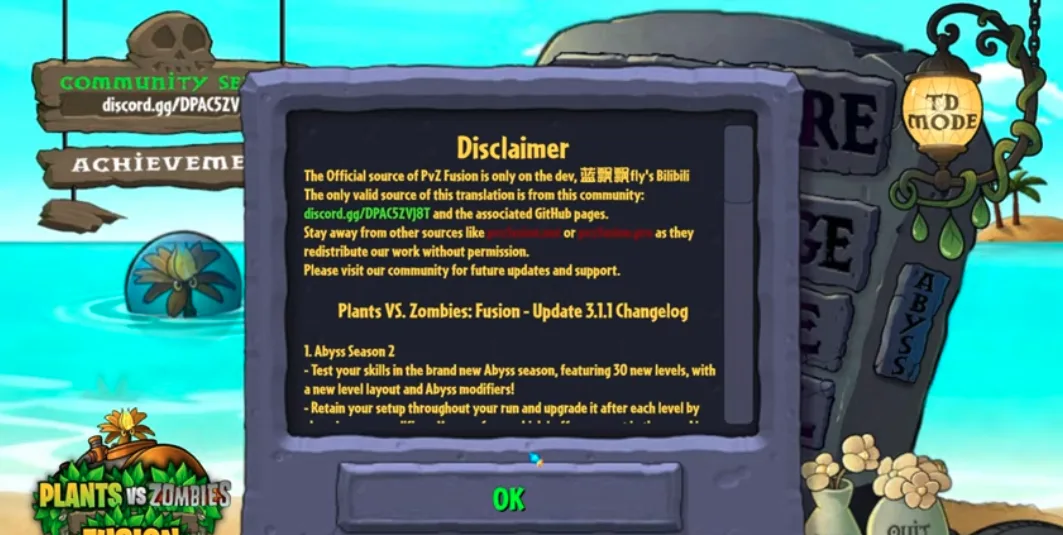
ภาพหน้าจอของ PvZ Fusion บนพีซี
ดูตัวอย่าง PvZ Fusion เวอร์ชัน PC บน Windows รวมถึงเกมเพลย์บนเดสก์ท็อปและแอคชั่น Fusion Plant
ทำไมต้องเล่น Plants vs Zombies Fusion บนพีซี?
เวอร์ชัน Windows เป็นตัวเลือกที่ดีที่สุดสำหรับผู้เล่นที่ต้องการการตั้งค่า Plants vs Zombies Fusion ที่เสถียร พร้อมการควบคุมที่ง่ายกว่า ภาพที่ชัดเจนกว่า และการจัดการบันทึกที่ง่ายกว่าการติดตั้ง APK บนมือถือ
หน้าจอที่ใหญ่ขึ้นสำหรับคลื่นที่ไม่ว่าง
PvZ Fusion สามารถเติมเต็มสนามหญ้าด้วยพืชผสม โพรเจกไทล์ หน่วยโล่ และเอฟเฟกต์ซอมบี้พิเศษ การเล่นบนจอภาพช่วยให้อ่านความกดดันของเลน มองเห็นภัยคุกคามจากการบิน และตอบสนองก่อนที่เลนจะพังได้ง่ายขึ้น
การควบคุมเมาส์และคีย์บอร์ด
เวอร์ชันพีซีให้การควบคุมเคอร์เซอร์ที่แม่นยำสำหรับการวางตำแหน่งพืชและการทดลองฟิวชั่นอย่างรวดเร็ว มีประโยชน์อย่างยิ่งเมื่อทำการทดสอบฟิวชันเชนราคาแพงหรือเคลื่อนที่ระหว่างเลนระหว่างบอสเวฟ
ประสิทธิภาพที่ดีขึ้นในเซสชันระยะยาว
พีซีที่ใช้ Windows มักจะจัดการกับคลื่นซอมบี้ขนาดใหญ่ ระดับแบบกำหนดเอง และเอฟเฟ็กต์ภาพได้สม่ำเสมอกว่าโทรศัพท์รุ่นเก่า หากอุปกรณ์ Android ของคุณล่าช้าในช่วงท้ายเกม โครงสร้างพีซีมักจะราบรื่นกว่า
บันทึกการสำรองข้อมูลและอัพเดตได้ง่ายขึ้น
บน Windows คุณสามารถสำรองข้อมูลไฟล์บันทึกได้ก่อนอัปเดตเป็น PvZ Fusion เวอร์ชันใหม่ สิ่งนี้ทำให้ปลอดภัยยิ่งขึ้นในการทดสอบการออกใหม่ในขณะที่ยังคงรักษาความคืบหน้าในปัจจุบันของคุณไว้
Native PC Build กับ Emulator
แนะนำให้ใช้ Windows build ดั้งเดิมสำหรับผู้เล่นส่วนใหญ่ การเล่นโปรแกรมจำลองมีประโยชน์เมื่อคุณต้องการ Android APK โดยเฉพาะ แต่โดยปกติแล้วต้องใช้ RAM มากกว่าและเพิ่มเลเยอร์ความเข้ากันได้อีกชั้นหนึ่ง
วิธีการติดตั้ง PvZ Fusion บน Windows
ขั้นตอนที่ 1: ดาวน์โหลดและแตกไฟล์
- คลิกปุ่มดาวน์โหลดด้านบนและตรวจสอบรายการมิเรอร์สำหรับขนาดไฟล์เก็บถาวรปัจจุบัน
- รอให้การดาวน์โหลดเสร็จสิ้น
- คลิกขวาที่ไฟล์ ZIP แล้วเลือก 'แยกทั้งหมด'
- แยกเป็นพาธง่ายๆ เช่น C:\Games\PvZFusion — หลีกเลี่ยงโฟลเดอร์บนเดสก์ท็อป ดาวน์โหลด หรือซิงค์กับ OneDrive
- ตรวจสอบให้แน่ใจว่าเส้นทางโฟลเดอร์ไม่มีอักขระพิเศษหรือตัวอักษรเน้นเสียง
ขั้นตอนที่ 2: ติดตั้งการพึ่งพารันไทม์
- เปิดโฟลเดอร์ _Redist ภายในโฟลเดอร์เกมที่แยกออกมา
- ติดตั้งแพ็คเกจ Visual C++ Redistributable ทั้งหมดที่พบที่นั่น
- ขั้นตอนนี้แก้ไขข้อผิดพลาด 'DLL ที่หายไป' หรือ 'ข้อผิดพลาดของแอปพลิเคชัน' ส่วนใหญ่ในการเปิดตัวครั้งแรก
ขั้นตอนที่ 3: เปิดเกม
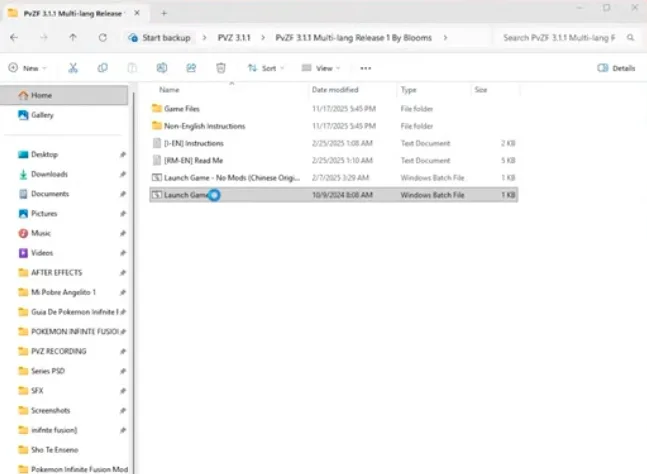
- ดับเบิลคลิก 'Launch Game.bat' เพื่อเริ่ม PvZ Fusion
- อย่าเรียกใช้ PvZFusion.exe โดยตรง — ให้ใช้ .bat launcher เสมอ
- หาก Windows SmartScreen บล็อกไว้ ให้คลิก 'ข้อมูลเพิ่มเติม' → 'เรียกใช้ต่อไป'
PvZ Fusion ปลอดภัยในการดาวน์โหลดหรือไม่
ต้องการลิงก์ Quark Drive PC อย่างเป็นทางการ หรือใช้กระจก MEGA ที่มีป้ายกำกับชัดเจน เปรียบเทียบรายละเอียดไฟล์เก็บถาวรและสแกน ZIP ก่อนเปิด คำเตือนแอนตี้ไวรัสอาจมีสาเหตุหลายประการ ดังนั้นควรตรวจสอบผลการตรวจจับก่อนที่จะกู้คืนไฟล์หรือเพิ่มการยกเว้น
วิธีเล่น PvZ Fusion เป็นภาษาอังกฤษบนพีซี
PvZ Fusion จะเป็นภาษาจีนตัวย่อตามค่าเริ่มต้น ชุมชน Blooms มีโครงการแปลหลายภาษาฟรีบน GitHub สำหรับผู้เล่นพีซี การเผยแพร่การแปลสามารถติดตาม PvZ Fusion 4.0.5 พีซีรุ่นใหม่ล่าสุดได้ ดังนั้นควรดาวน์โหลดแพตช์ที่ตรงกับเวอร์ชันเกมที่คุณติดตั้งไว้เสมอ แพตช์ภาษาอังกฤษจะแปลเมนู ชื่อพืช ชื่อซอมบี้ และคำอธิบายในเกมเมื่อมีการวางจำหน่ายที่ตรงกัน
- ดาวน์โหลดเวอร์ชันหลายภาษาล่าสุดจากหน้า Blooms GitHub (การแปล PVZF)
- แตกไฟล์การแปลลงในโฟลเดอร์เกม PvZ Fusion ของคุณ โดยเขียนทับไฟล์ที่มีอยู่
- เปิดเกมและไปที่การตั้งค่า → ภาษา → อังกฤษ
- หากข้อความยังคงเป็นภาษาจีน ให้ตรวจสอบว่าคุณดาวน์โหลดรุ่นที่ตรงกับเวอร์ชันพีซีที่คุณติดตั้งไว้
ข้อกำหนดของระบบสำหรับ PvZ Fusion บนพีซี
| ขั้นต่ำ | แนะนำ | |
|---|---|---|
| ระบบปฏิบัติการ | วินโดวส์ 7 | วินโดว์ 10 หรือ 11 |
| ซีพียู | Intel Core i3 หรือเทียบเท่า | Intel Core i5 หรือเทียบเท่า |
| แรม | 2 กิกะไบต์ | 4 กิกะไบต์ |
| จีพียู | รองรับ DirectX 9.0c | รองรับ DirectX 11 |
| ที่เก็บของ | พื้นที่ว่าง 500 MB | พื้นที่ว่าง 1 GB |
การแก้ไขปัญหาวินโดวส์
โปรแกรมป้องกันไวรัสบล็อกหรือลบ PvZ Fusion
อย่าถือว่าการตรวจจับไวรัสเป็นผลบวกลวง ยืนยันว่า ZIP มาจากมิเรอร์ที่อยู่ในรายการ เปรียบเทียบรายละเอียด และสแกนด้วยเครื่องมือรักษาความปลอดภัยมากกว่าหนึ่งรายการ กู้คืนไฟล์ที่ถูกกักกันหรือเพิ่มการยกเว้นหลังจากที่คุณได้ตรวจสอบการตรวจพบและเชื่อถือแหล่งที่มาแล้วเท่านั้น
ข้อผิดพลาดที่สามารถแจกจ่ายต่อได้ของ Visual C++ (DLL หายไป)
ติดตั้งแพ็คเกจทั้งหมดจากโฟลเดอร์ _Redist ภายในไดเร็กทอรีเกม หากไม่มีโฟลเดอร์ _Redist ให้ดาวน์โหลด Visual C++ 2015-2022 Redistributable (x86 และ x64) โดยตรงจากเว็บไซต์ของ Microsoft
เกมไม่เปิดหรือล่มเมื่อเริ่มต้น
ตรวจสอบให้แน่ใจว่าคุณกำลังเรียกใช้ 'Launch Game.bat' ไม่ใช่ไฟล์ .exe โดยตรง ลองคลิกขวาที่ไฟล์ .bat → เรียกใช้ในฐานะผู้ดูแลระบบ ตรวจสอบว่าเส้นทางของเกมไม่มีการเว้นวรรค สำเนียง หรืออักขระที่ไม่ใช่ภาษาอังกฤษ ปิดใช้งานการเพิ่มประสิทธิภาพแบบเต็มหน้าจอบน PvZFusion.exe หากยังคงเกิดปัญหาอยู่
เส้นทางมีข้อผิดพลาดอักขระพิเศษ
ย้ายโฟลเดอร์เกมไปยังเส้นทางง่ายๆ เช่น C:\Games\PvZFusion. หลีกเลี่ยงเส้นทางที่มีการเว้นวรรค อักขระเน้นเสียง ตัวอักษรที่ไม่ใช่ภาษาอังกฤษ หรือฝังอยู่ในโฟลเดอร์ OneDrive, Desktop หรือ Downloads
ดาวน์โหลด PvZ Fusion PC หลายภาษา
PvZ Fusion PC มีให้บริการในหลายภาษา ต้องขอบคุณโครงการแปลชุมชน Blooms ดาวน์โหลดเวอร์ชันที่ตรงกับภาษาของคุณด้านล่าง
| ภาษา | เวอร์ชันล่าสุด | สถานะ | ดาวน์โหลด |
|---|---|---|---|
| อังกฤษ | 3.6.1 | ทันสมัย | GitHub |
| เวียดนาม (TiếngViet) | 3.4.2 | มีจำหน่าย | GitHub |
| สเปน (สเปน) | 3.4.2 | มีจำหน่าย | GitHub |
| ฝรั่งเศส (ฝรั่งเศส) | 3.3.1 | มีจำหน่าย | GitHub |
| ญี่ปุ่น (日本語) | 3.3.1 | มีจำหน่าย | GitHub |
| รัสเซีย (Русский) | 3.3.1 | มีจำหน่าย | GitHub |
การแปลทั้งหมดได้รับการติดตั้งโดยการแตกไฟล์การแปลลงในโฟลเดอร์เกม PvZ Fusion ของคุณ ดู คู่มือการแปลภาษาอังกฤษ ของเราสำหรับคำแนะนำโดยละเอียด — กระบวนการจะเหมือนกันในทุกภาษา
คู่มือการติดตั้งวิดีโอสำหรับ PvZ Fusion PC
ชมวิดีโอสอนทีละขั้นตอนสำหรับการติดตั้ง PvZ Fusion บน Windows PC
วิธีเล่น PvZ Fusion Android บนพีซีโดยใช้โปรแกรมจำลอง
หากคุณต้องการ PvZ Fusion เวอร์ชัน Android บนหน้าจอที่ใหญ่กว่า คุณสามารถเรียกใช้ APK บนพีซีของคุณโดยใช้โปรแกรมจำลอง Android นอกจากนี้ยังมีประโยชน์หากเวอร์ชัน Windows มีปัญหาความเข้ากันได้ในระบบของคุณ
- ดาวน์โหลดและติดตั้งโปรแกรมจำลอง Android: BlueStacks, LDPlayer หรือ NoxPlayer เป็นสิ่งที่แนะนำ
- ดาวน์โหลด PvZ Fusion APK จาก หน้าดาวน์โหลด PvZ Fusion APK
- เปิดโปรแกรมจำลองแล้วลากไฟล์ APK ไปที่หน้าต่างโปรแกรมจำลอง หรือใช้คุณสมบัติการติดตั้ง APK ของโปรแกรมจำลอง
- รอให้การติดตั้งเสร็จสิ้น จากนั้นเปิด PvZ Fusion จากลิ้นชักแอปของโปรแกรมจำลอง
เวอร์ชั่น PC ก่อนหน้า — ดาวน์โหลดไฟล์เก็บถาวร
ต้องการ Plants vs Zombies Fusion เวอร์ชันเก่าสำหรับพีซีหรือไม่ ใช้ไฟล์เก็บถาวรนี้เพื่อข้ามไปยังรีลีสที่เสถียร รุ่นหลายภาษา และแพ็คเกจ Windows รุ่นเก่าโดยตรง
| เวอร์ชัน | วันที่วางจำหน่าย | ไฮไลท์ | ดาวน์โหลด |
|---|---|---|---|
| 4.0 | 2026-09-19 | Snowfield Night, Demon Plants, Gods: Evolution เพิ่มเติม และการทำงานร่วมกันใหม่ๆ | ดาวน์โหลด |
| 3.9 | 2026-08-15 | เทพเจ้าวิวัฒน์นรก, การทดลองคำสาป, ฟิวชั่นและบอสใหม่ | ดาวน์โหลด |
| 3.8.1 | 2026-07-18 | Magic Ice Shooter, บอส Black Olive General, แก้ไขการเอาชีวิตรอด | ดาวน์โหลด |
| 3.8 | 2026-07-12 | อัพเดตครบรอบ 2 ปี | ดาวน์โหลด |
| 3.7 | 2026-06-07 | อัปเดต Snowfield, Commando และ Elemental Synergy | ดาวน์โหลด |
| 3.6.1 | 2026-05-10 | การเปิดตัวอย่างเป็นทางการที่เสถียร | ดาวน์โหลด |
| 3.6 | 2026-04-12 | โหมดการเดินทางและการอัปเดตทุ่งหิมะ | ดาวน์โหลด |
| 3.5 | 2026-02-28 | ตัวแก้ไขระดับแบบกำหนดเองขั้นสูง | ดาวน์โหลด |
| 3.4.2 | 2026-01-25 | อัพเดตยอดคงเหลือ | ดาวน์โหลด |
| 3.4.1 | 2026-01-10 | โปรแกรมแก้ไขด่วนการปรับปรุงการเดินทาง | ดาวน์โหลด |
| 3.4 | 2025-12-20 | อัพเดตการเดินทาง | ดาวน์โหลด |
| 3.3.1 | 2025-12-15 | โครงสร้างที่เสถียรและเป็นมิตรกับหลายภาษา | ดาวน์โหลด |
| 3.2.1 | 2025-12-23 | โครงสร้างความเข้ากันได้ของ Windows รุ่นเก่า | ดาวน์โหลด |
| 3.1.1 | 2025-10-15 | การเปิดตัวพีซีรุ่นเก่า | ดาวน์โหลด |
| 2.8.2 | 2025-08-14 | พีซีรุ่นเก่ายอดนิยม | ดาวน์โหลด |
| 2.7 | 2025-07-05 | ไฟล์เก็บถาวรการอัปเดตวิวัฒนาการ | ดาวน์โหลด |
| 2.6.1 | 2025-06-15 | โปรแกรมแก้ไขด่วนชุด 2.6 ที่เสถียร | ดาวน์โหลด |
| 2.5.1 | 2025-04-27 | เวอร์ชันเก่าพร้อมรองรับการแปลแบบเก่า | ดาวน์โหลด |
| 2.1.7 | 2024-04-05 | ไฟล์เก็บถาวรพีซีรุ่นเก่าแบบคลาสสิก | ดาวน์โหลด |
PvZ Fusion PC — คำถามที่พบบ่อย
ความต้องการของระบบสำหรับ PvZ Fusion บนพีซีมีอะไรบ้าง?
PvZ Fusion ทำงานบน Windows 7, 8, 10 และ 11 ข้อกำหนดขั้นต่ำคือโปรเซสเซอร์ Intel Core i3, RAM 2 GB, DirectX 9.0c และพื้นที่ว่างในดิสก์ 500 MB เพื่อประสบการณ์ที่ดีที่สุด เราขอแนะนำ Windows 10/11 พร้อม RAM 4 GB และ DirectX 11
ฉันจะติดตั้ง PvZ Fusion บนพีซีได้อย่างไร
ดาวน์โหลดไฟล์ ZIP จากลิงก์ด้านบน แยกไฟล์ไปยังพาธโฟลเดอร์ง่ายๆ เช่น C:\Games\PvZFusion, ติดตั้ง Visual C++ Redistributables จากโฟลเดอร์ _Redist จากนั้นเปิดเกมโดยใช้ 'Launch Game.bat' หลีกเลี่ยงการแตกไฟล์ไปยังเดสก์ท็อป ดาวน์โหลด หรือโฟลเดอร์ที่ซิงค์กับ OneDrive
ฉันจะเล่น PvZ Fusion เป็นภาษาอังกฤษบนพีซีได้อย่างไร
PvZ Fusion จะเป็นภาษาจีนตามค่าเริ่มต้น ดาวน์โหลดแพทช์แปลภาษาอังกฤษจากหน้า GitHub ชุมชน Blooms (การแปล PVZF) แยกลงในโฟลเดอร์เกมของคุณ และเลือกภาษาอังกฤษในการตั้งค่าภาษาในเกม ไปที่ คู่มือการแปลภาษาอังกฤษ ของเราเพื่อดูคำแนะนำโดยละเอียดทีละขั้นตอน
แอนตี้ไวรัสของฉันติดธง PvZ Fusion ว่าเป็นภัยคุกคาม ปลอดภัยไหม?
ไฟล์เกมแบบกำหนดเองสามารถกระตุ้นคำเตือนของโปรแกรมป้องกันไวรัสได้ แต่อย่าถือว่าการตรวจจับทุกครั้งเป็นผลบวกลวง ยืนยันว่าคุณใช้ลิงก์ที่แสดง เปรียบเทียบรายละเอียดไฟล์เก็บถาวร และสแกนไฟล์ กู้คืนเฉพาะไฟล์ที่ถูกกักกันหรือเพิ่มการยกเว้นหลังจากตรวจสอบการตรวจหาและแหล่งที่มาแล้ว
ฉันจะอัปเดต PvZ Fusion เป็นเวอร์ชันใหม่บนพีซีได้อย่างไร
ดาวน์โหลดไฟล์ ZIP เวอร์ชันใหม่จาก หน้าดาวน์โหลด ของเรา จากนั้นแยกไฟล์ไปยังโฟลเดอร์ใหม่ จากนั้นคัดลอกไฟล์บันทึกของคุณจากการติดตั้งเก่า ไฟล์บันทึกอยู่ที่ C:\Users\[YourName]\AppData\LocalLow\LanPiaoPiao\PlantsVsZombiesRH. สำรองข้อมูลการบันทึกของคุณทุกครั้งก่อนที่จะอัปเดต
ฉันสามารถใช้คอนโทรลเลอร์เกมเพื่อเล่น PvZ Fusion บนพีซีได้หรือไม่
PvZ Fusion ได้รับการออกแบบมาเพื่อการป้อนข้อมูลด้วยเมาส์และคีย์บอร์ด ไม่มีการรองรับคอนโทรลเลอร์แบบเนทิฟ แต่คุณสามารถใช้เครื่องมือของบริษัทอื่น เช่น JoyToKey หรือ Steam Input เพื่อแมปปุ่มคอนโทรลเลอร์กับการทำงานของเมาส์และคีย์บอร์ดได้
ไฟล์บันทึก PvZ Fusion อยู่ที่ไหนบน Windows
ไฟล์บันทึกจะถูกเก็บไว้ที่ C:\Users\[YourName]\AppData\LocalLow\LanPiaoPiao\PlantsVsZombiesRH. หากต้องการเข้าถึงโฟลเดอร์นี้ ให้กด Win+R พิมพ์ %appdata% และเลื่อนขึ้นหนึ่งระดับไปที่ LocalLow สำรองข้อมูลโฟลเดอร์นี้ก่อนที่จะอัปเดตหรือติดตั้งเกมใหม่
ฉันสามารถรัน PvZ Fusion บน Windows 7 ได้หรือไม่?
ใช่ PvZ Fusion รองรับ Windows 7 ตรวจสอบให้แน่ใจว่าคุณได้ติดตั้ง DirectX 9.0c และติดตั้ง Visual C++ Redistributables จากโฟลเดอร์ _Redist ที่รวมอยู่ในการดาวน์โหลด หากเกมขัดข้องใน Windows 7 ให้ลองเรียกใช้ 'Launch Game.bat' ในฐานะผู้ดูแลระบบ
เครดิต
แปลโดย: Bioxcis, Prats, NickZin006 และ Shellyuwa
ขอขอบคุณเป็นพิเศษสำหรับ Dyna, Nakune, Lanpiaopiao (ผู้สร้าง) และ ANGGA (แก้ไขข้อบกพร่อง)
การดาวน์โหลดแสดงว่าคุณยอมรับข้อกำหนดในการให้บริการและนโยบายความเป็นส่วนตัวของเรา
เพื่อประสบการณ์การเล่นเกมที่ดีที่สุด ตรวจสอบให้แน่ใจว่าอุปกรณ์ของคุณตรงตามข้อกำหนดขั้นต่ำของระบบ
ดูซอร์สโค้ดบน GitHub